Showing posts with label Video tips. Show all posts

View Article


vj software, vj software free, free vj software, best vj software, vj software best, video vj software, dj vj software, vj software windows, vj software free download, vj software pc, pc vj software, open source vj software, vj software open source, pcdj vj software, live vj software, modul8 vj software, vj software review, pro vj software, 3d vj software, the best vj software, professional vj software

I learned about tilt-shift effect while learning photoshop software. Tilt-shift effect is what adds miniature faking effect to a scene. In miniature faking a scene of life size or object is made to look like a scene of a scale model miniature. Blurred parts of the scene suggests that the depth usually occur in close-ups, which makes the scene seem much smaller than it is, the blur can be done either visually by taking a picture, or after digital processing .

Optically


Miniatures can be simulated optically by using lens tilt. Miniature faking using tilt is less effective if a scene includes objects of significant size, such as tall buildings or trees, especially when shoot at a small angle to the ground

Digital Post-processing


A miniature can also be simulated digitally, using sharpness gradients extending from the middle of the scene to the top and bottom, the effect is quite similar to that obtained using lens tilt. Though it has limitations similar to those of lens tilt, more realistic simulation is possible. A simple map depth composed of a linear gradient can be modified to give a sharp uniform objects at the same distance from the camera. Even simple digital techniques allow greater flexibility than optical techniques, including the ability to choose the region of sharpness and the amount of blur to blur areas after the actual was shooting. In addition, miniature digital effects do not require a camera with movements or special (and often very expensive) lens.
Checkout this Miniature faking tutorial for video and these amazing videos created using these techniques (optically as well as digitally).


Avid Liquid 7 is an video editing and authoring software created by Pinnacle Systems.Though they have mentioned support for only Windows XP, it is possible to use Avid Liquid 7 on Windows Vista and Windows 7. Tip is very simple. You just need to run it under compatibility mode. To do this

  • Right Chick on Avid Liquid 7 Shortcut
  • Open file location
  • Right Click on exe file
  • Properties
  • Click compatibility tab
  • Tick mark ‘Run this program in compatibility mode’ and choose Windows XP (Service Pack 2)
  • Apply and run the software.

1. Bharat Movies :- On this site you can watch Hindi, Telugu, Tamil Movies Online, Download Hindi, Telugu, Tamil Movies .

2. 123onlinemovies :- This blog is updated daily about telugu movies, hindi movies, bollywood, tollywood, cricket, tv shows in india .

3. lazydesis :- On this you can get links for music videos and movies . But are divided in parts .

4. Bindaasbharat :- I think this site is also best because they provide full length movies in differnt languages like Hindi , Tamil , Kannada , Telugu , Punjabi , Malayalam , Bengali , English , Marathi movies .

5. Muft Tv :- It is a Indian/Pakistani Films & Television portal for desi to watch online desi videos, online movies, teasers, hindi movies,online indian media .

6. Desifun :- This site provides latest new movies as well as video songs . You can also watch top TV serials like Saregamapa 2009 , Indian Idol 4 , Nach Baliye 4 , Zara Nachke Dikha , Mtv SplitsVilla online .

7. HIndi movies online :- It is another free site which offer Bollywood movies. I saw that they have some good new movies like drona , karzzz, kidnap , hello etc .

8. Bollywood Tv :- On this site you can watch online hindi movies in different languages and regions , movie trailer videos , songs , cricket etc .

Is your PC or laptop laptop lagging behind in playing HD videos?Even if you have a good processor,graphic card and memory,it will not run HD videos smoothly.You need to have good codecs installed.Codec is what really matters.You need to have a good programmed codec pack.Use Combined Community Codec Pack.Its free.It delivers smooth HD videos.It comes bundled with many players.

Before installing,uninstall all other codec packs(k-lite codec pack).You may use the insurgent utility to find which codecs are installed

Pinnacle decided to release a free version of video editing software called VideoSpin. This program is absolutely free and can be used to create and edit your home videos or just mix some video clip from various sources. For 15 days you can use all the features of VideoSpin but after this period you won't be able to save your movies to iPod compatible, divx, mpeg-2 and mpeg-4 file formats. However you still can save videos as avi, mpeg-1 and flv formats.

VideoSpin supports transitions, title making, adding images to video projects, adding external sound clips.

video spin editing optionsApart those one the niciest feature about VideoSpin is that it can upload your rendered video straight to Youtube and Yahoo! Videos. You just have to enter your login details, video title and description, and VideoSpin will take care of the rest.
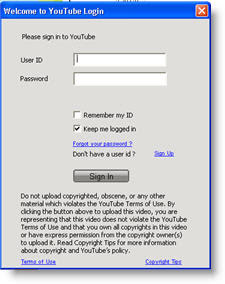
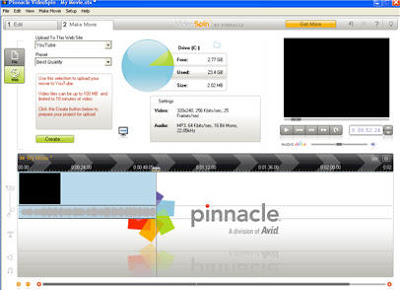
video spin youtube screen video spin main window

Download VideoSpin here